Professional Stream Downloader for Windows

Download Streams.
Save What Matters.

Save webinars, training sessions, and live events for offline viewing on Windows. HiDownload sniffs M3U8/HLS/DASH links and downloads them in one workflow.

Built-in URL Sniffer Fast & Stable Downloads Privacy First — No Ads
See How It Works

Windows 10 / 11 (64-bit)  ·  Latest version: v12.0  ·  What’s New →

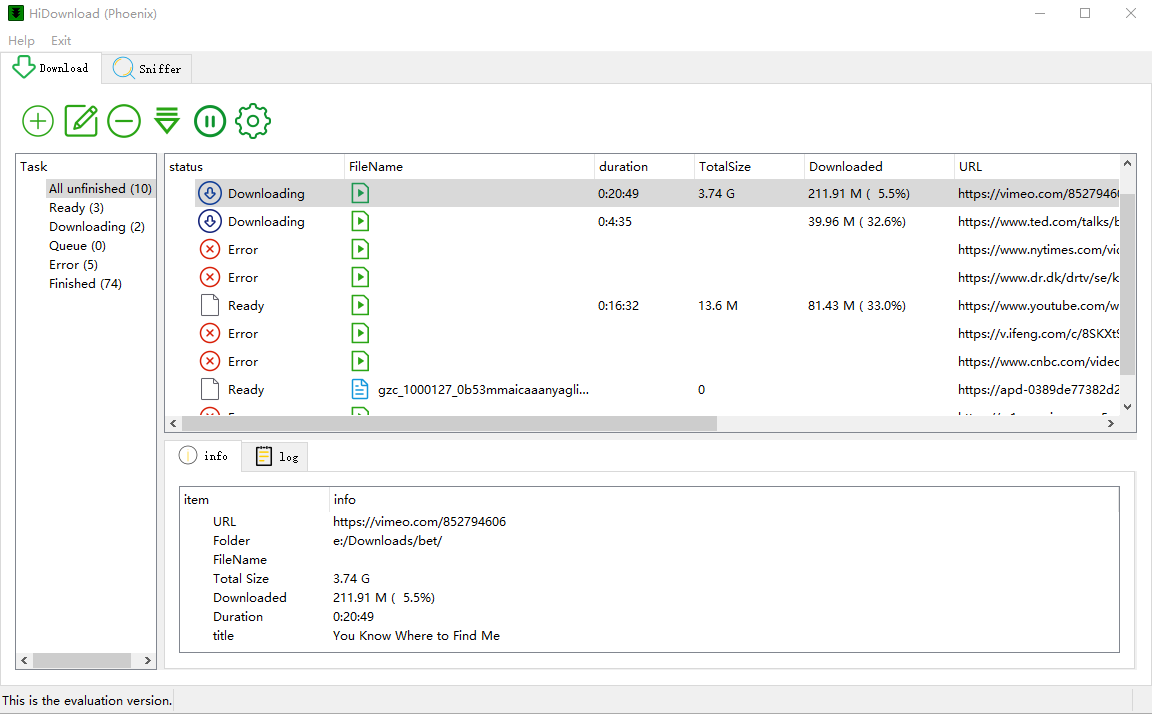
HiDownload Phoenix download manager interface on Windows
500K+
Downloads
4.8/5
User Rating
100%
Clean & Safe
24/7
Support

Powerful Features

Everything you need to download and save streaming content.

🔍

Stream URL Sniffer

Merge HLS segments into a single local file without manual scripting

Download & Convert

Save webinar or training recordings for offline review

High Quality

Capture live event streams while they are still on air (where permitted)

Batch Download

Sniff hidden M3U8/MPD links the player never shows in the address bar

Resume Support

Resume long jobs and manage multiple captures from one queue

🛡

Privacy First

No ads, no trackers. Your data stays on your device.

How It Works

Three simple steps to save any stream or video.

1

Play the Video

Open the page and play the video or live stream in HiDownload.

2

Sniff the Link

HiDownload detects M3U8, HLS, DASH and MP4 links—click to capture.

3

Download & Save

Download an entire playlist or channel in one batch job

Supported Streaming Formats & Protocols

M3U8, HLS, DASH, live streams and more.

HLSM3U8 DASHMPD RTMP HTTPHTTPS RTSP MP4 MP3 MKV FLV More…

HiDownload is built for today's streaming web—not legacy desktop players. Common formats and protocols include:

  • M3U8 / HLS — adaptive HTTP live streaming (.m3u8 playlists)
  • DASH / MPD — MPEG-DASH manifests and fragmented media
  • HTTP / HTTPS — direct MP4, WebM and progressive downloads
  • RTMP / RTSP — when publishers still expose these endpoints
  • Live streams — capture while the broadcast is online

Need help choosing a workflow? See our streaming protocol guide.

User Reviews

See what users say about HiDownload (Phoenix).

★★★★★

The built-in sniffer finds .m3u8 links quickly and merged files play fine in VLC. A game changer for my online courses.

S
Sarah Johnson
Course Creator
★★★★★

We capture permitted sports replays in high quality. Live HLS jobs run smoothly until the broadcast ends.

M
Mike Chen
Sports Editor
★★★★★

The stream URL sniffer is amazing—finds hidden DASH links other tools miss. Simple enough for our whole IT team.

A
Alex Rodriguez
IT Specialist

More

Ready to save your next stream?

Free download for Windows. No subscription required to get started.

Real-World Use Cases

  • Education — keep lecture replays your institution allows you to store
  • Events — record conferences or launches you have rights to archive
  • Media monitoring — save reference clips for internal review
  • Personal backup — offline copies of content you already pay for

Only download content you are legally allowed to save. HiDownload is a tool; compliance is always your responsibility.

Popular Step-by-Step Guides

Frequently Asked Questions

An M3U8 downloader saves HLS streams by reading .m3u8 playlist files and downloading segments (often .ts) into a single video file. HiDownload (Phoenix) automates sniffing, queueing and merging so you do not need manual ffmpeg commands for every site.

Yes. When a live HLS or DASH manifest is available, HiDownload can record while the broadcast is online. Results depend on the publisher's player and whether the stream URL is exposed to the sniffer.

The built-in sniffer monitors network requests in the embedded browser session and lists candidate media URLs (M3U8, MP4, DASH, etc.). You pick the correct link and send it to the download engine—ideal when a page hides the real stream address.

Extensions often break after site updates and struggle with encrypted or fragmented streams. HiDownload is a dedicated Windows stream downloader with sniffing, batch queues, and protocol support designed for long recording sessions.

Yes. Paste a playlist or channel URL and HiDownload can enumerate entries for batch download—useful for course series, music albums or multi-part tutorials.